I am a software engineer with over 10 years of experience in a huge variety of projects and architectures, some simple others considerably complex.
Some of my main skills include Software Architecture, Web Development, ASP.NET Core, React.js, Entity Framework Core, Javascript, SQL and Web Services.
I consider myself passionate about coding as I really fell excited about learning technologies and using them to automate and improve processes.
Objective 🎯
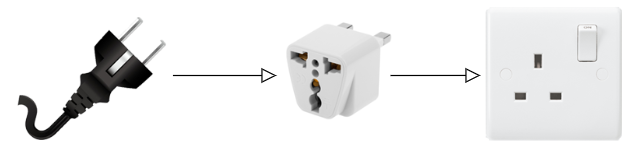
Allow objects with different interfaces to communicate between themselves. It works as a bridge between two incompatible objects/interfaces.
Type ✅
❌Behavioral: Describes how objects interact/communicate between themselves.
❌Creational: Describes how to instantiate an object without large and complex.
✔️Structural: Describes how objects/classes are composed to form larger structures.
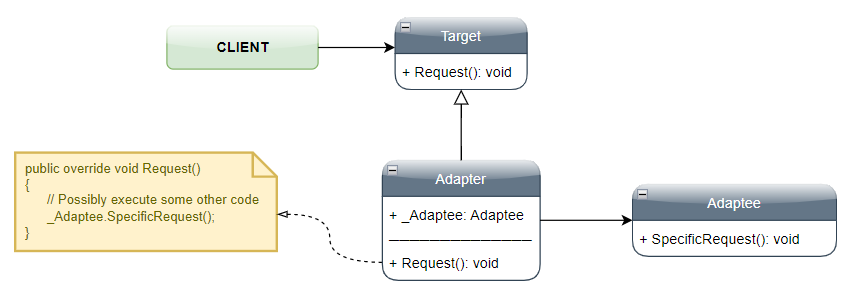
UML 📐
Participants 🔗
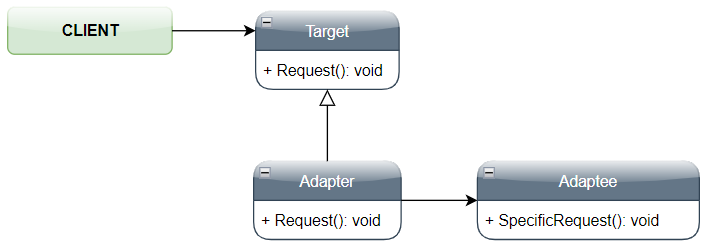
• Target:
- Defines the specific interface that the Client is expecting
• Adapter:
- Adapts the external class (Adaptee) to meet the requirements expected by the Target class
• Adaptee:
- Any existing interface/code that needs to be adapted.
Sample Code 🎮
Structural Example 🏛️
public static class AdapterStructural
    {
        public static void Execute()
        {
            Target lTarget = new Adapter();
            lTarget.Request();
        }
    }

    public class Target
    {
        public virtual void Request()
        {
            Console.WriteLine("Target - Executing Default Request");
        }
    }

    public class Adapter : Target
    {
        private Adaptee _Adaptee = new Adaptee();

        public override void Request()
        {
            // Possibly execute some other code
            _Adaptee.SpecificRequest();
        }
    }

    public class Adaptee
    {
        public void SpecificRequest()
        {
            Console.WriteLine("Adaptee - Executing Specific Requirement");
        }
    }
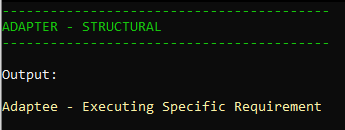
Output
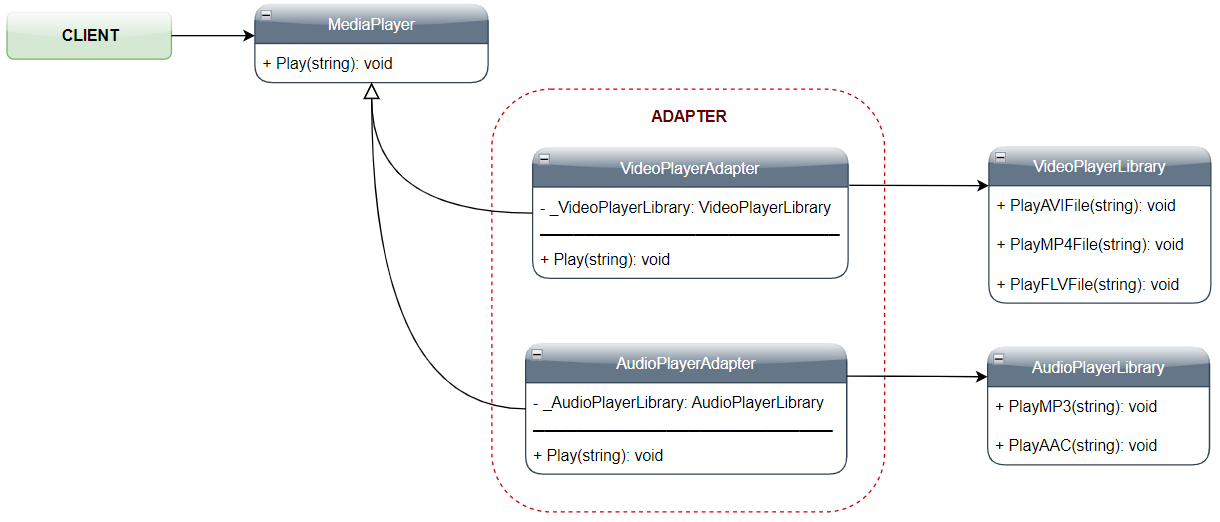
Real-world Example 🔥
public static class AdapterPractical
    {
        public static void Execute()
        {
            MediaPlayer lMediaPlayer = new MediaPlayer();
            lMediaPlayer.Play("C:\\FolderA\\FileA.mp4");

            lMediaPlayer = new VideoPlayerAdapter();
            lMediaPlayer.Play("C:\\FolderA\\FileA.mp4");
            lMediaPlayer.Play("C:\\FolderA\\FileB.flv");

            lMediaPlayer = new AudioPlayerAdapter();
            lMediaPlayer.Play("C:\\FolderA\\FileC.mp3");
            lMediaPlayer.Play("C:\\FolderA\\FileD.aac");
            lMediaPlayer.Play("C:\\FolderA\\FileE.oog");
        }
    }

    public class MediaPlayer
    {
        public virtual void Play(String prFile)
        {
            Console.WriteLine("MediaPlayer - Media Player Unknown...");
        }
    }

    public class VideoPlayerAdapter : MediaPlayer
    {
        private VideoPlayerLibrary _VideoPlayerLibrary = new VideoPlayerLibrary();

        public override void Play(String prFile)
        {
            string lExtension = prFile.Substring(prFile.Length - 3);

            switch (lExtension.ToUpper())
            {
                case "AVI":
                    _VideoPlayerLibrary.PlayAVIFile(prFile);
                    break;
                case "MP4":
                    _VideoPlayerLibrary.PlayMP4File(prFile);
                    break;
                case "FLV":
                    _VideoPlayerLibrary.PlayFLVFile(prFile);
                    break;
                default:
                    Console.WriteLine("VideoPlayerAdapter - Video Format Not Supported...");
                    break;
            }
        }
    }

    public class AudioPlayerAdapter : MediaPlayer
    {
        private AudioPlayerLibrary _AudioPlayerLibrary = new AudioPlayerLibrary();

        public override void Play(String prFile)
        {
            string lExtension = prFile.Substring(prFile.Length - 3);

            switch (lExtension.ToUpper())
            {
                case "MP3":
                    _AudioPlayerLibrary.PlayMP3File(prFile);
                    break;
                case "AAC":
                    _AudioPlayerLibrary.PlayAACFile(prFile);
                    break;
                default:
                    Console.WriteLine("AudioPlayerAdapter - Audio Format Not Supported...");
                    break;
            }
        }
    }

    public class VideoPlayerLibrary
    {
        public void PlayAVIFile(String prFile) { Console.WriteLine("VideoPlayerLibrary - Playing AVI File..."); }
        public void PlayMP4File(String prFile) { Console.WriteLine("VideoPlayerLibrary - Playing MP4 File..."); }
        public void PlayFLVFile(String prFile) { Console.WriteLine("VideoPlayerLibrary - Playing FLV File..."); }
    }

    public class AudioPlayerLibrary
    {
        public void PlayMP3File(String prFile) { Console.WriteLine("AudioPlayerLibrary - Playing MP3 File..."); }
        public void PlayAACFile(String prFile) { Console.WriteLine("AudioPlayerLibrary - Playing AAC File..."); }
    }
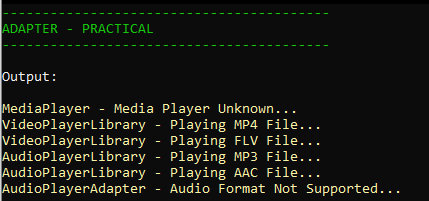
Output
Source Code 🎲
https://github.com/VictorLins/DesignPatterns